SIW vs CPU-Z: Which Windows System Information Tool Is Better?
Your one-stop solution for all your computer information needs.Latest SIW version: 16.16.1014 Released: October 14th, 2026 • What's new Download the free 14-day trial Buy SIW
Short answer
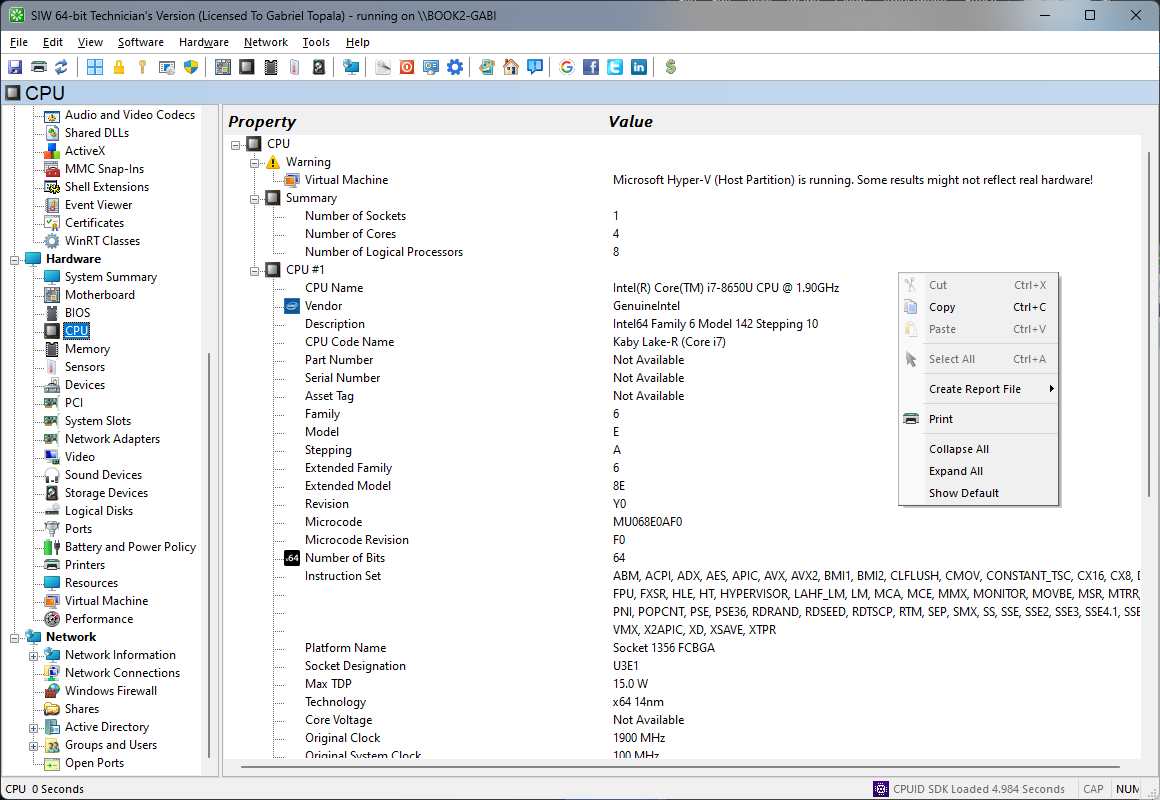
Neither tool is universally better. CPU-Z is a focused hardware identification and validation utility, especially useful for CPU, motherboard, memory, and SPD details. SIW is a broader Windows inventory tool that combines hardware with installed software, services, network configuration, security-related information, sensors, and multi-format reporting.
Choose CPU-Z when you need a small, focused view of processor and memory characteristics. Choose SIW when the question includes the rest of the Windows system or when you need a reusable inventory report.
Capability comparison
| Capability | SIW | CPU-Z | Practical difference |
|---|---|---|---|
| CPU identification | Yes | Yes | Both identify processor model, architecture, clocks, and related characteristics. |
| Motherboard, chipset, and BIOS | Yes | Yes | Both provide core board and firmware identity; SIW places it in a wider system inventory. |
| Memory and SPD details | Yes | Yes | CPU-Z is particularly focused on module-level SPD and timing inspection. |
| Hardware sensors | Yes, hardware-dependent | Limited, hardware-dependent | SIW has a dedicated Sensors module; CPU-Z exposes selected monitoring and clock information rather than a general sensor inventory. |
| Installed software inventory | Yes | Not a primary feature | SIW can inventory registered programs, licenses, updates, processes, drivers, and services. |
| Network configuration | Yes | Not a primary feature | SIW reports adapters, addresses, connections, ports, shares, and related network information. |
| Windows services and processes | Yes | Not a primary feature | SIW can inspect the software environment beyond hardware identification. |
| System reporting | Multi-module reports and command-line output | Hardware-focused TXT, HTML, validation, and screenshot output | CPU-Z reports are useful for hardware validation; SIW reports are designed for broader inventory and support cases. |
| Portable use | Technician's Version is portable | CPUID provides a standalone distribution as well as an installer | Both can be used without a traditional install, subject to their respective terms. |
Where CPU-Z is the better fit
- Checking a processor model, stepping, cache, clock, or instruction-set detail quickly.
- Inspecting each memory module's SPD record, timings, and supported profiles.
- Capturing a compact hardware validation or CPU/memory report.
- Using a small, focused utility when a complete Windows inventory is unnecessary.
CPU-Z's narrow scope is an advantage when the question is specifically about CPU, mainboard, or RAM characteristics. Installing a larger inventory tool is not necessary for that use case.
Where SIW is the better fit
- Documenting a Windows computer's hardware, software, network, and configuration in one report.
- Checking installed applications, licenses, Windows updates, services, drivers, processes, and scheduled tasks.
- Investigating IP addresses, open ports, shares, firewall settings, or Active Directory context.
- Collecting a portable technician report across multiple systems.
Edition and scope notes
CPU-Z is distributed by CPUID as a focused hardware utility with installer and standalone options. The official CPU-Z documentation describes CPU, mainboard, memory, SPD, sensor configuration, and TXT or HTML report parameters, but it does not present CPU-Z as a Windows software, services, or network inventory suite.
SIW uses the CPUID SDK for supported hardware detection, the same SDK used by CPUID's CPU-Z and HWMonitor. This shared component helps explain why the tools can report overlapping CPU, motherboard, memory, and sensor data, while SIW extends beyond hardware into Windows software, network, and inventory reporting.
SIW editions have different installation and licensing purposes. The Home Edition is intended for personal use, while the Technician's Version is portable and intended for professional technical work. Confirm the current SIW license terms before using either product in an organization.