How to Check Open Network Ports in Windows
Your one-stop solution for all your computer information needs.Latest SIW version: 16.16.1014 Released: October 14th, 2026 • What's new Download the free 14-day trial Buy SIW
Short answer
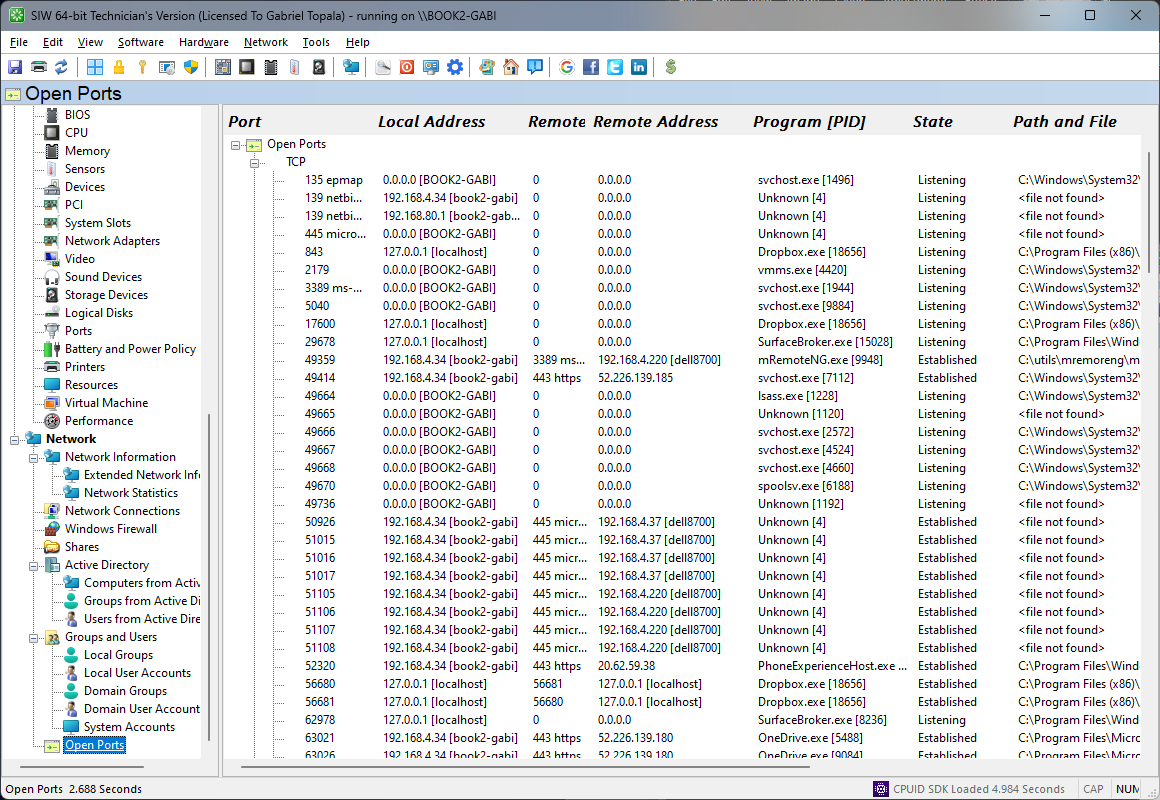
Run netstat -ano to list active TCP and UDP endpoints with process IDs. For a structured PowerShell view, run Get-NetTCPConnection -State Listen and map each OwningProcess to a process. SIW shows open ports, local and remote endpoints, protocol, state, and related process information in Network > Open Ports.
Use netstat
Open Command Prompt or PowerShell and run:
netstat -anoThe output includes protocol, local address, local port, remote address, remote port, connection state, and the owning process ID. Add -b when you need Windows to try to show the executable behind each connection; that option may require an elevated console and can take longer.
To show only listening TCP endpoints in a quick text search:
netstat -ano | findstr LISTENINGFor a connectivity problem, also record the adapter and gateway from ipconfig /all. A port listing explains what is listening locally; it does not by itself prove that DNS, routing, firewall rules, or the remote service are working.
Use PowerShell for structured port data
List TCP ports waiting for incoming connections:
Get-NetTCPConnection -State Listen |
    Select-Object LocalAddress, LocalPort, OwningProcess, State |
    Sort-Object LocalPort
List UDP endpoints:
Get-NetUDPEndpoint |
    Select-Object LocalAddress, LocalPort, OwningProcess |
    Sort-Object LocalPort
Replace 1234 with a process ID from either command:
Get-Process -Id 1234Use Get-NetTCPConnection to distinguish listening and established TCP connections. UDP has no TCP-style connection state, so its endpoint list must be interpreted with the owning process and local binding.
Check open ports in SIW
- Run SIW.
- Expand Network and select Open Ports.
- Review protocol, local and remote address, port number, state, and associated process information where available.
- Use the result with the Windows Firewall module and the owning process inventory to investigate unexpected listeners.
What an open port does and does not mean
A listening port means that a local process has registered an endpoint. It does not prove that the port is reachable from another computer. The process may be bound only to loopback, restricted to one interface, blocked by Windows Firewall, filtered by a router, or isolated behind NAT.
A binding to 0.0.0.0 or :: can represent all local IPv4 or IPv6 interfaces, while 127.0.0.1 or ::1 is loopback-only. Check the binding, firewall profile, service configuration, and network path before concluding that a service is exposed.
Record the process ID and executable path before stopping a listener. Terminating a system process or disabling a service without understanding its role can interrupt remote access or other applications.