How to Find Your Microsoft Office Product Key
Your one-stop solution for all your computer information needs.Latest SIW version: 16.16.1014 Released: October 14th, 2026 • What's new Download the free 14-day trial Buy SIW
Short answer
Start with the purchase email, receipt, product card, or packaging. If you already redeemed Office, sign in to the Microsoft account used to buy or redeem it and use Services & subscriptions to install or manage the product. Office 2013 and later commonly expose only the last five characters of the key on the computer, so a complete key usually cannot be recovered from Windows alone.
Do not confuse an Office key with a Windows key. The correct recovery route depends on whether Office came from a retail purchase, Microsoft Store, Microsoft 365 subscription, an employer or school, or a computer manufacturer.
Check your purchase records first
- Search the email account used at checkout for the retailer, order number, and Office edition.
- Check junk mail, archived messages, invoices, and the retailer's order history.
- For a boxed purchase, inspect the product card, certificate, manual, and packaging. A Windows sticker is not an Office key.
- Record the Office edition, purchase date, seller, and account used, but keep the complete key private.
For an eligible, unredeemed Microsoft Store purchase, sign in with the purchasing account, open Order History, locate the Office order, and choose the available Office installation or key option. A key is not guaranteed to remain visible for every redeemed purchase.
Use the Microsoft account linked to Office
- Open Word or Excel if Office is still installed.
- Select File > Account and note the product name and account shown under Product Information.
- Sign in to Microsoft Services & subscriptions with that account.
- Select the Office product and use the available install, manage, or renewal option.
Microsoft 365 and many one-time Office purchases are associated with an account after redemption. In that situation, the account is normally more useful for reinstalling and activation than trying to display the original 25-character key. If the product is missing, try the other personal account used at purchase; for a work or school account, contact the organization's administrator.
Microsoft 365 and replacement keys
If Office was installed through a Microsoft 365 subscription, sign in with the subscription account and use its install or manage option. A subscription normally does not require a separate key for each reinstall. Do not use a public setup key or a key from another Office edition to activate it.
If a valid retail purchase cannot be recovered, contact Microsoft Support. Have the receipt or invoice, order number, seller, purchase email, exact Office edition, and any activation error ready. Microsoft may offer replacement or account-recovery options after verifying the purchase, but a replacement is not guaranteed.
Check for a partial key with SIW
SIW can inspect supported software-license information already exposed by Windows. It cannot reconstruct a missing Office key, but it may show the final five characters for Office 2013, 2016, 2019, or 2021. That suffix can help match an installed copy to an invoice or email.
- Run SIW from the publisher's official download.
- Expand Software and select Licenses.
- Look for Partial Key: Office and record only the product name, edition, computer, and final five characters.
- Search your private purchase records for that suffix and verify the complete key from the original source.
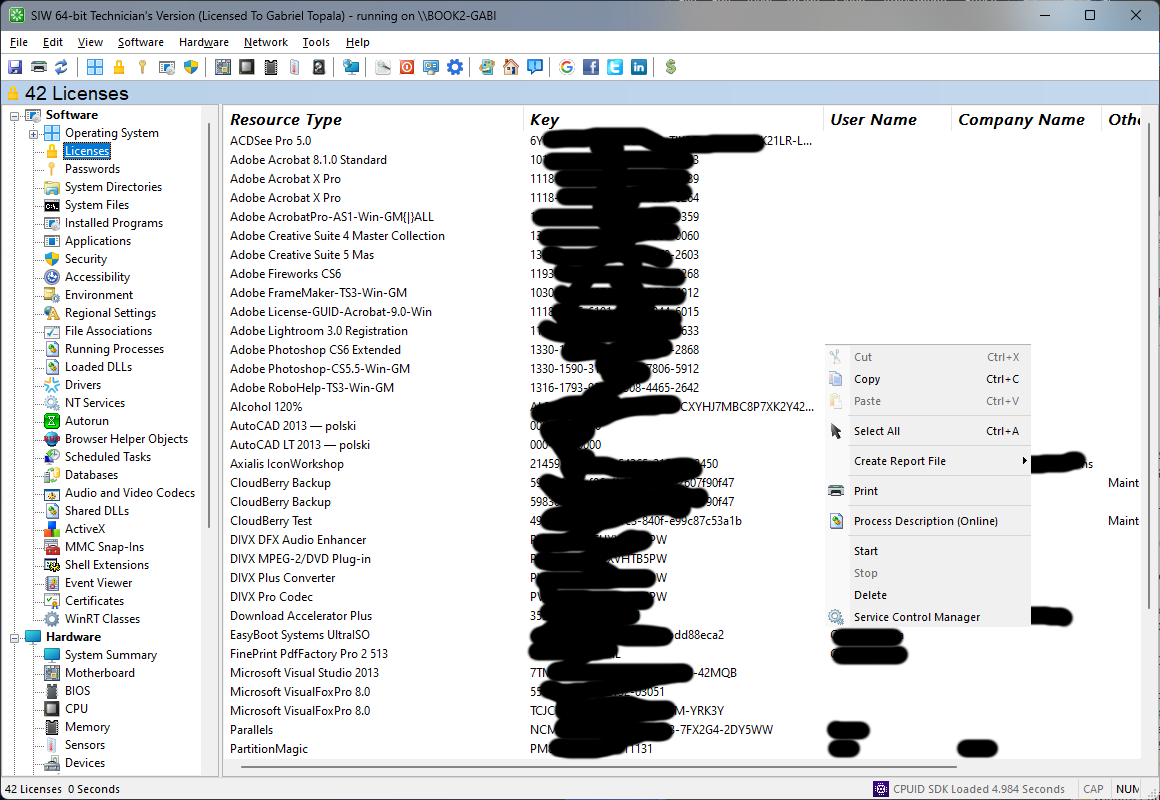
Keep the suffix private when possible. It is useful for matching records, but it is not enough to activate Office and should not be used to infer a complete key.
When the key is managed by an organization
For Microsoft 365 provided by an employer or school, sign in with the organization account and contact the Microsoft 365 administrator if the product is missing or activation fails. Volume-license administrators can retrieve organization-managed keys from the Microsoft 365 admin center when their assigned role permits it. A user's computer is not a substitute for the organization's licensing records.
Workplace Discount Program purchases and older Office editions can have separate account, order-history, or support requirements. Gather the purchase email, receipt, exact edition, and error message before contacting Microsoft or the organization's support team.
Protect your product key
Never publish a complete key in a forum, screenshot, issue tracker, or chat. Redact keys, account addresses, order numbers, activation identifiers, and organization names before sharing a report. A partial key and the Office edition are usually enough for troubleshooting.