How to Check BIOS Version and Manufacturer
Your one-stop solution for all your computer information needs.Latest SIW version: 16.16.1014 Released: October 14th, 2026 • What's new Download the free 14-day trial Buy SIW
Short answer
Press Windows + R, run msinfo32, and read BIOS Version/Date in System Summary. PowerShell can retrieve the manufacturer and firmware record with Win32_BIOS, and SIW provides a broader BIOS or UEFI inventory together with motherboard and boot information.
Use System Information (msinfo32)
- Open Start and search for System Information, or press Windows + R, type
msinfo32, and press Enter. - Keep System Summary selected.
- Read BIOS Version/Date. Also note BIOS Mode if it is present; it normally identifies UEFI or Legacy boot mode.
Copy the complete vendor and version string, including punctuation and suffixes. Firmware vendors often publish several builds with similar names, so a shortened version can lead to the wrong update.
Query the firmware with PowerShell
Open PowerShell and run:
Get-CimInstance -ClassName Win32_BIOS |
    Select-Object Manufacturer, SMBIOSBIOSVersion, Version, ReleaseDate
SMBIOSBIOSVersion is commonly the most useful version string. ReleaseDate is supplied as a firmware date and may be displayed by PowerShell as a CIM date value. If the result is blank or generic, use the system manufacturer's support utility or SIW as a second view.
Find the BIOS details in SIW
- Run SIW.
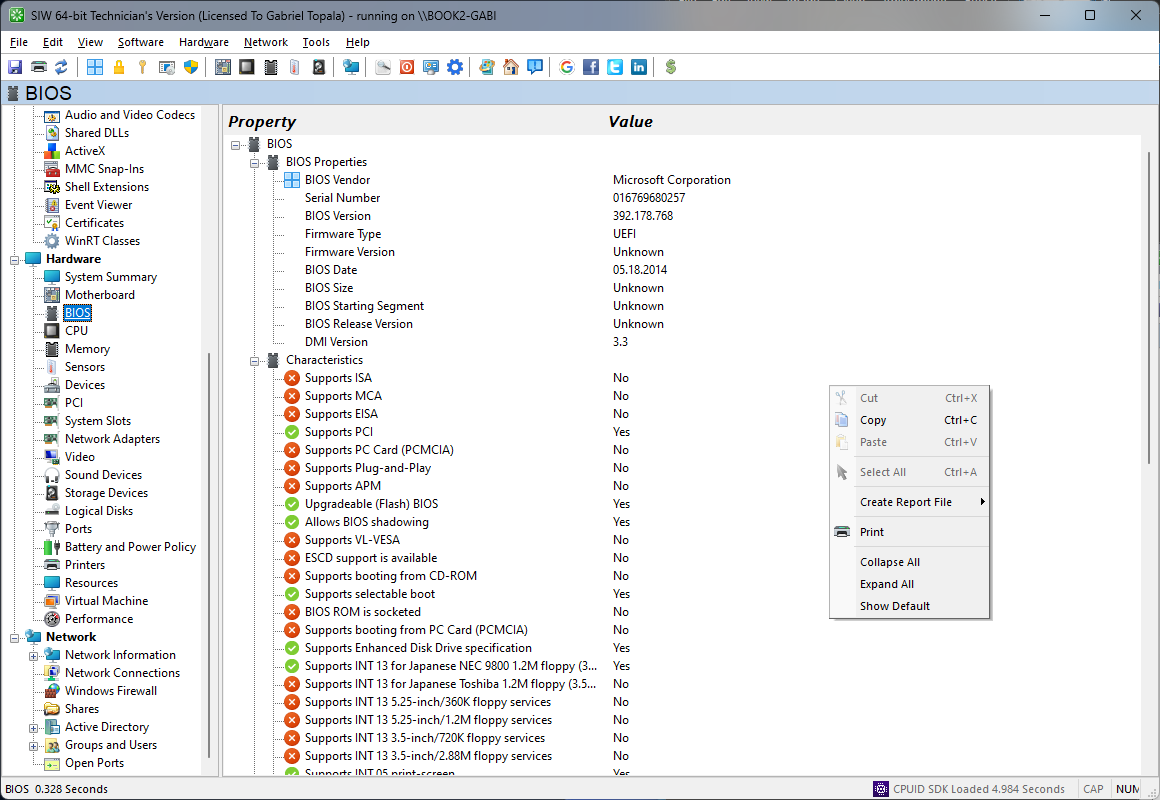
- Expand Hardware and select BIOS.
- Review the firmware vendor, version, build identifier, release date, firmware type, boot mode, secure boot status, and SMBIOS information that the platform exposes.
BIOS, UEFI, and version strings
BIOS is commonly used as a general name for the firmware that initializes the computer. Modern PCs usually use UEFI, which provides the firmware environment and boot services. Windows and firmware may show a vendor version, a build number, a date, and an SMBIOS version; these values describe related but different things.
Do not start a firmware update solely because a newer number exists. Confirm the exact computer or motherboard model, current firmware mode, vendor instructions, power requirements, and recovery process. A failed or mismatched firmware update can prevent the system from starting.