How to Find Your Motherboard Model in Windows
Your one-stop solution for all your computer information needs.Latest SIW version: 16.16.1014 Released: October 14th, 2026 • What's new Download the free 14-day trial Buy SIW
Short answer
The quickest built-in method is to press Windows + R, run msinfo32, and read BaseBoard Manufacturer, BaseBoard Product, and BaseBoard Version under System Summary. PowerShell can query the same SMBIOS data, while SIW adds a richer motherboard inventory and hardware relationships.
Use System Information (msinfo32)
- Open the Start menu and type System Information, or press Windows + R, type
msinfo32, and press Enter. - Leave System Summary selected in the navigation tree.
- Find BaseBoard Manufacturer, BaseBoard Product, and BaseBoard Version.
- Record the values exactly as shown before looking for a BIOS update, replacement part, or compatible expansion card.
System Information reads the inventory that Windows receives from the firmware. It is a good first answer for a physical PC, but it does not repair missing or generic firmware strings.
Query the motherboard with PowerShell
Open PowerShell and run:
Get-CimInstance -ClassName Win32_BaseBoard |
    Select-Object Manufacturer, Product, Version, SerialNumber
To compare the board with the computer's overall model, run:
Get-CimInstance -ClassName Win32_ComputerSystem |
    Select-Object Manufacturer, Model
Win32_BaseBoard describes the baseboard record; Win32_ComputerSystem describes the complete system. On a laptop, the system model is often more useful for support than the board code.
Find the motherboard in SIW
- Run SIW.
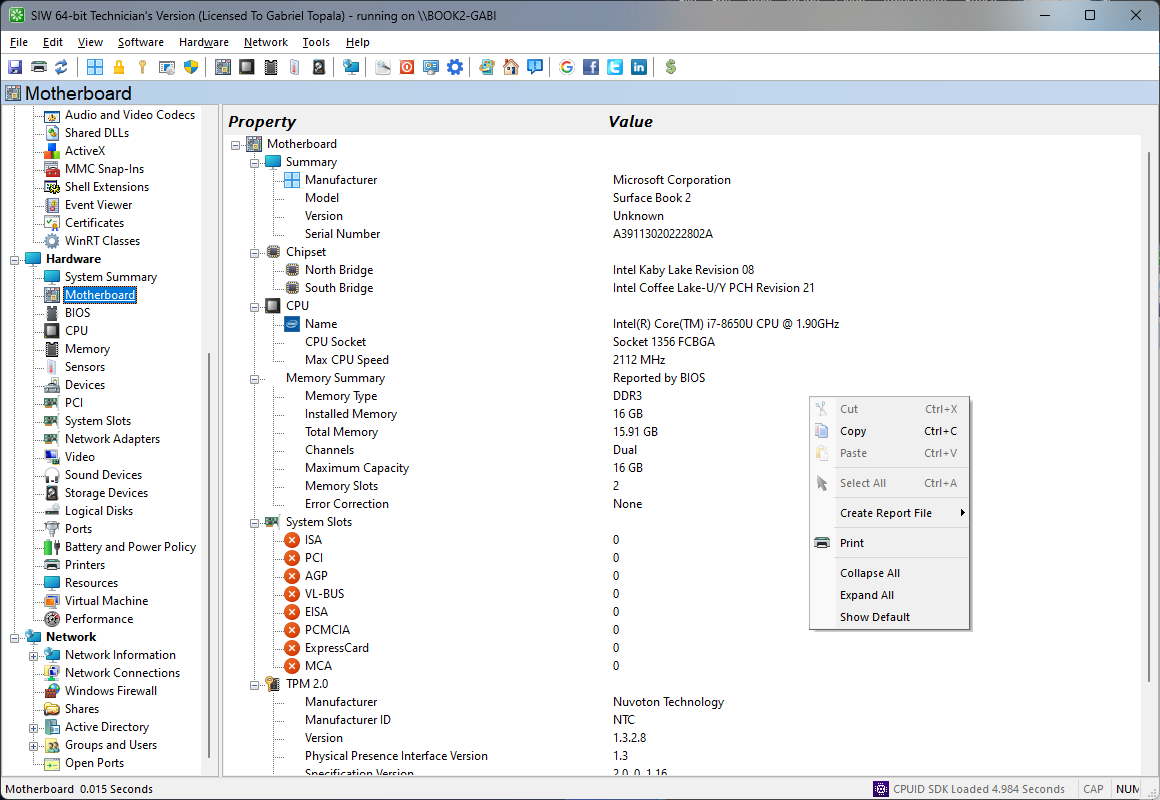
- Expand Hardware and select Motherboard.
- Review the manufacturer, product name, model or version, serial number, chipset, slots, onboard controllers, and related BIOS information when available.
Why the model can be missing or misleading
Motherboard names normally come from SMBIOS or DMI tables supplied by the firmware. A manufacturer may leave a field blank, use a generic value, reuse a board family name, or expose a system-board identifier that is not the retail product name.
- OEM desktops and laptops may use a system-specific board identifier instead of a retail motherboard name.
- Virtual machines expose a virtual board, not the host's physical motherboard.
- Clone images and refurbished systems can contain stale or generic SMBIOS values.
- A serial number may be absent, redacted, or set to a repeated default value.
Use the model printed on the chassis, the vendor support page, or the manufacturer's service tag to confirm an ambiguous result. Do not choose firmware or hardware solely from a generic string.