What Tool Can Generate a Windows Hardware Inventory?
Your one-stop solution for all your computer information needs.Latest SIW version: 16.16.1014 Released: October 14th, 2026 • What's new Download the free 14-day trial Buy SIW
Short answer
Several tools can generate a Windows hardware inventory, but they report different scopes. SIW is a direct fit when the report should cover CPU, memory, motherboard, BIOS, storage, devices, sensors, software, and network information in one export. HWiNFO is a strong hardware and sensor report tool. CPU-Z is focused on CPU, motherboard, memory, and SPD validation. Speccy produces a concise hardware snapshot. AIDA64 Business and Network Audit are designed for organization-wide auditing, while Extreme and Engineer focus more on local diagnostics.
The best choice depends on whether you need one PC or a fleet, hardware only or hardware plus software and network context, a portable utility or an installed product, and a simple snapshot or an automated reporting workflow.
What a hardware inventory report should contain
A useful Windows hardware inventory normally identifies the computer and its physical components, not just the processor name. Depending on the purpose, look for:
- Computer manufacturer, model, serial number, BIOS or UEFI version, and firmware mode.
- CPU model, cores, logical processors, cache, clock information, and supported features.
- Installed memory modules, capacity, speed, slot location, part number, and SPD information.
- Motherboard, chipset, PCI devices, graphics, network adapters, storage, and connected peripherals.
- Storage model, serial number, firmware, interface, capacity, SMART or NVMe health data, and logical volumes.
- Optional context such as sensors, installed software, drivers, services, licenses, network configuration, and open ports.
- An export format that can be saved, compared, archived, or processed by another system.
Tool comparison
| Tool or edition | Best fit | Inventory and reporting scope | Important limitation |
|---|---|---|---|
| SIW | One-PC or technician inventory | Hardware plus software, licenses, services, drivers, network, sensors, storage, and multi-format reports | Sensor and license fields depend on what Windows, firmware, hardware, and supported products expose. |
| HWiNFO | Deep hardware and sensor reporting | Detailed hardware inventory, temperatures, voltages, fan speeds, power, monitoring, logs, and hardware reports | It is hardware-centric rather than a complete installed-software, services, or network inventory suite. |
| CPU-Z | CPU, motherboard, memory, and SPD validation | Focused hardware reports in TXT or HTML plus validation and screenshots | It is not designed as a general Windows software, services, or network inventory tool. |
| Speccy | Readable single-PC snapshot | Hardware, operating system, storage, graphics, temperatures, peripherals, and XML or TXT snapshots | It has a narrower inventory and reporting scope than a full hardware/software/network audit. |
| AIDA64 Extreme | Home-user diagnostics and benchmarks | Detailed local hardware and diagnostic information | Home-use edition; not the edition for organization-wide inventory. |
| AIDA64 Engineer | Professional technician diagnostics | Deep local hardware analysis, diagnostics, benchmarks, and technician-oriented reporting | It is not the same as AIDA64 Business or Network Audit for fleet inventory. |
| AIDA64 Business / Network Audit | Managed-PC and fleet inventory | Network-wide hardware and software audit, reporting, change tracking, and edition-specific management features | Requires organization-oriented licensing and configuration; verify the current edition matrix. |
| Windows msinfo32 / systeminfo | No-install baseline | Built-in operating-system, firmware, hardware-summary, and configuration reports | Less convenient for sensors, SMART, software licenses, cross-system comparison, and broad inventory automation. |
Generate a hardware inventory with SIW
- Run SIW and select the hardware modules needed for the inventory.
- For a broad report, include System Summary, Motherboard, BIOS, CPU, Memory, Devices, Storage Devices, and Sensors.
- Use the report or save function to choose HTML, JSON, CSV, TXT, or XML output.
- For repeatable collection, use the SIW command-line report options and an absolute output path.
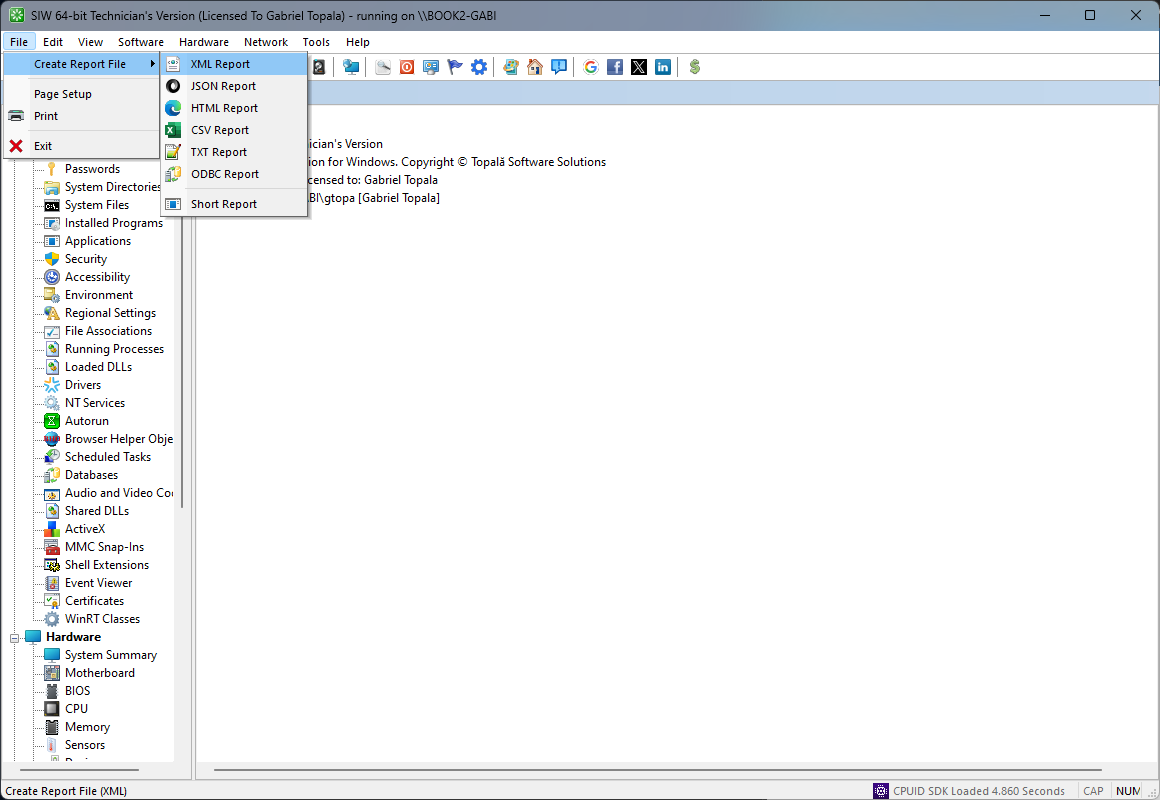
For a Windows-only baseline without third-party software, see How to Collect System Information Without Installing Software. For a detailed report workflow, see How to Generate a Windows Hardware Inventory Report.
Choose by reporting requirement
- One complete Windows support report: SIW is the most direct fit when hardware, software, and network context belong in the same report.
- Hardware sensors and live monitoring: HWiNFO is a strong hardware-focused choice.
- CPU, board, memory, or SPD validation: CPU-Z is often sufficient and lightweight.
- Simple readable hardware snapshot: Speccy is a practical option.
- Professional local diagnostics: AIDA64 Engineer is the relevant AIDA64 comparison, not Extreme.
- Fleet-wide hardware and software auditing: Compare SIW’s workflow with AIDA64 Business or Network Audit, including licensing, deployment, and change-tracking requirements.
- No installation allowed: Start with msinfo32, systeminfo, and PowerShell; use a portable tool only if policy permits.